

 |
| Xfer Records Serum 2 |
If you make electronic music, EDM, trap, hip-hop, pop, or any type of modern music that uses synthesizers, you have probably heard of Serum.
The original Serum from Xfer Records became one of the most popular software synthesizers in music production. Producers loved it because it offered powerful wavetable synthesis, excellent sound quality, flexible modulation, and a visual workflow that made sound design easier to understand.
Now there is Serum 2.
And this time, Xfer Records has gone much further than simply adding a few new features. Serum 2 expands the original concept into an advanced hybrid synthesizer with wavetable, sample, granular, spectral, and multisample capabilities.
But is all of this actually useful?
Is Serum 2 worth buying in 2026?
Is it better than Serum 1? Is it better than Vital? How much does it cost? Can you use your old Serum presets? Does it work with FL Studio and Ableton Live? And how demanding is it on your CPU?
Let's take a detailed look at Serum 2 and find out.
What Is Serum 2?
Serum 2 is a software synthesizer developed by Xfer Records.
Xfer originally created Serum with the goal of making a high-quality wavetable synthesizer with a visual and creative workflow that would make creating and changing sounds more enjoyable.
With Serum 2, that idea has been expanded considerably.
Serum 2 is now a hybrid synthesizer that combines multiple sound-generation methods inside one instrument.
You can work with:
- Wavetable synthesis
- Sample-based synthesis
- Granular synthesis
- Spectral synthesis
- Multisample synthesis
- Advanced modulation
- Flexible effects routing
- Arpeggiator and clip sequencer features
That combination gives Serum 2 a much wider sonic range than the original Serum.
Serum 2 keeps the familiar wavetable workflow that made the original Serum so popular, but it expands the instrument with several new synthesis options, including sample, granular, spectral, and multisample capabilities.
This makes Serum 2 much more than a traditional wavetable synthesizer.
You can use it to create basses, leads, pads, plucks, arps, cinematic textures, atmospheric sounds, experimental effects, and many other types of sounds.
There is also a very important reason why existing Serum users should consider upgrading: eligible Serum 1 owners can upgrade to Serum 2 for free. Xfer Records also allows Serum 1 and Serum 2 to remain installed together.
For new users, however, the decision is different.
Serum 2 currently costs $249, so it is not a cheap beginner plugin. If you are on a tight budget, free alternatives such as Vital may make more sense.
But if you are serious about music production and sound design, Serum 2 is one of the most complete software synthesizers you can buy.
What's New in Serum 2?
The biggest change in Serum 2 is the number of different ways you can generate and manipulate sound.
The original Serum was primarily known for wavetable synthesis. Serum 2 keeps that foundation but adds several new engines that open up completely different sound-design possibilities.
1. Wavetable Synthesis
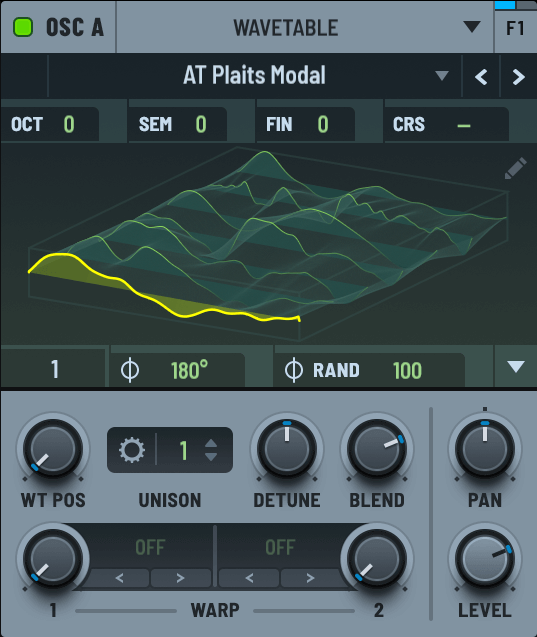
Wavetable synthesis is still one of the main strengths of Serum 2.
You can manipulate wavetables, scan through different waveforms, modulate their position, and create sounds that constantly change over time.
This makes Serum 2 especially useful for modern electronic music.
You can create:
- EDM leads
- Supersaws
- Future bass sounds
- Dubstep basses
- Plucks
- Arpeggios
- Digital pads
- Experimental sounds
- 808-style basses
And because you can apply modulation to so many parameters, even a simple waveform can become a very complex sound.
2. Sample Oscillator
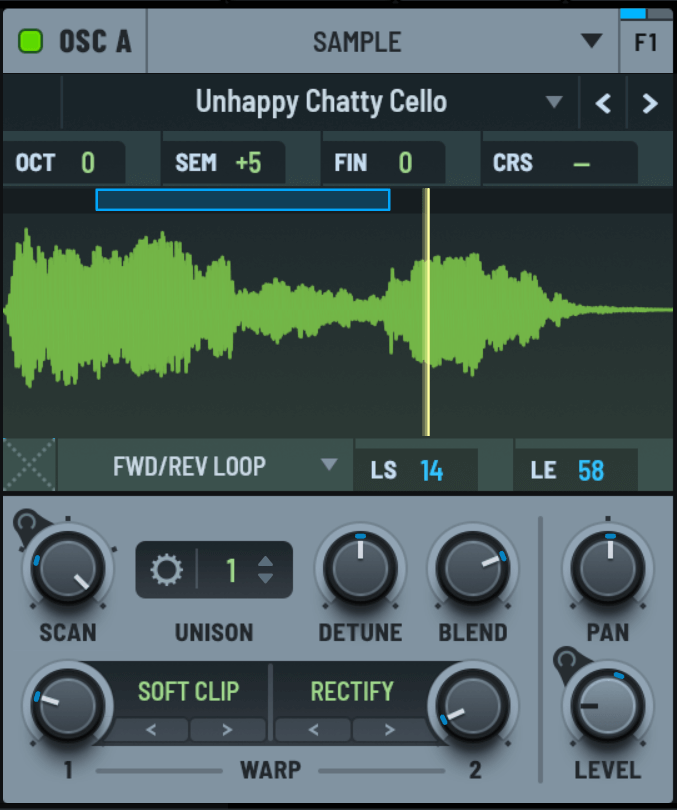
One of the biggest additions in Serum 2 is the sample oscillator.
This allows you to use audio samples as part of your synthesizer patches.
Instead of starting only with traditional oscillator waveforms, you can work with recorded sounds, instruments, vocals, textures, noises, and other audio material.
You can then manipulate that material inside Serum 2 using the synth's modulation and processing tools.
This opens up a completely different approach to sound design.
3. Granular Synthesis
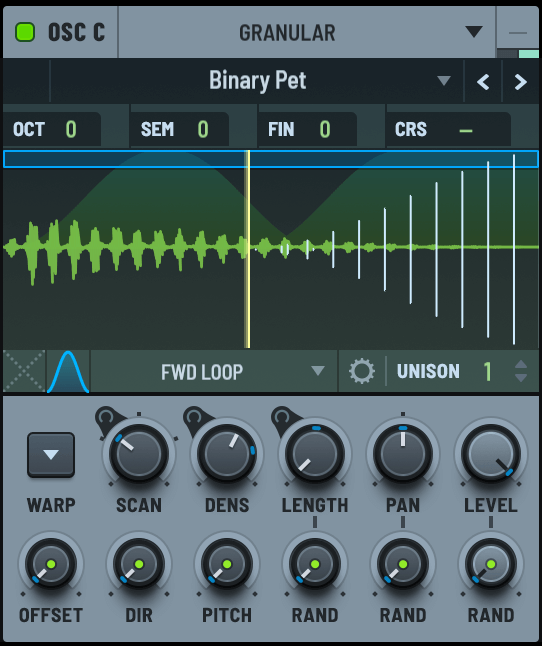
Serum 2 also includes granular synthesis.
Granular synthesis works by breaking audio into very small pieces called grains and then manipulating those pieces to create new sounds.
This can produce sounds that feel organic, constantly changing, or completely experimental.
Granular synthesis can be particularly useful for:
- Ambient pads
- Atmospheric textures
- Glitch effects
- Cinematic sounds
- Experimental sound design
- Soundscapes
- Transitions
If you enjoy creating unusual textures rather than just traditional synth sounds, this is one of the most interesting additions in Serum 2.
4. Spectral Synthesis
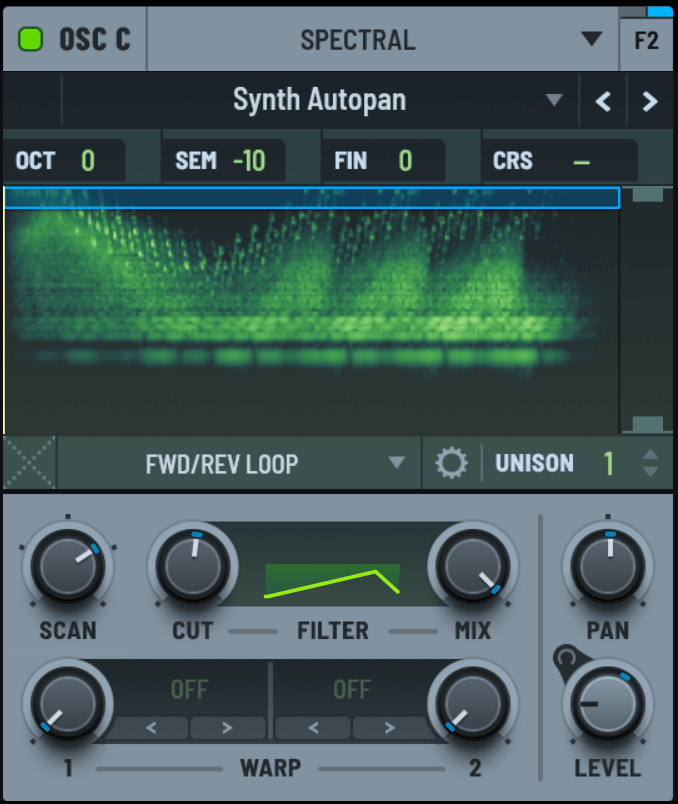
Another major addition is the spectral oscillator.
Spectral synthesis gives you another way of manipulating the frequency content of a sound.
This can be used to create unusual harmonic structures, metallic sounds, digital textures, evolving tones, and experimental effects.
For sound designers, this can be extremely powerful because it provides another dimension of control beyond traditional oscillators and filters.
5. Multisample Synthesis
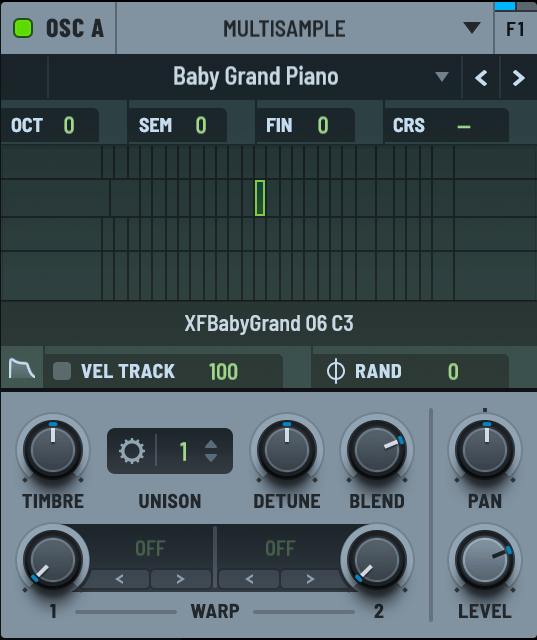
Serum 2 also includes multisample capabilities.
This allows you to work with sampled instruments and sounds while still taking advantage of Serum's modulation and sound-design workflow.
That makes Serum 2 useful for more than just synthetic sounds.
You can combine sampled material with synthesis and processing to create patches that would be difficult to build with the original Serum.
Serum 2 Modulation
Modulation has always been one of Serum's strongest features, and it remains an important part of Serum 2.
You can use modulation to create movement in your sounds by changing parameters over time.
For example, you can modulate:
- Wavetable position
- Pitch
- Filters
- Effects
- Oscillator parameters
- Volume
- Other sound-design controls
This is what allows you to turn a static sound into something that moves and evolves.
A simple pad, for example, can slowly change its tone over several seconds. A bass can become more aggressive during a drop. A lead can have rhythmic movement synced to your project.
This level of modulation control is one of the reasons Serum became so popular among electronic music producers.
Serum 2 Effects and Signal Routing
Serum 2 also provides flexible effects and signal-routing options.
This means you can do a large amount of sound shaping directly inside the synthesizer instead of depending entirely on external plugins.
For sound designers, this is useful because you can create a complete preset that already has its processing built into the patch.
You can then load the preset in your DAW and immediately start working with it.
Serum 2 Presets and Wavetables
Another major reason Serum has become so popular is its huge preset and wavetable ecosystem.
The current official Serum 2 product page lists 626 presets and 288 wavetables.
There are also thousands of third-party presets and sound banks available from different sound designers and music-production companies.
This is useful even if you don't know much about synthesis.
You can start with a preset, look at how it is constructed, and then change individual parameters to learn how the sound works.
For beginners, this can actually be a great way to learn sound design.
Can You Use Serum 1 Presets in Serum 2?
Yes.
Xfer Records confirms that Serum 1 presets are fully compatible with Serum 2 and can automatically appear in the Serum 2 preset browser.
That is excellent news if you already have a large collection of Serum 1 presets.
However, compatibility only works in one direction.
Serum 2 presets cannot be loaded into Serum 1.
Serum 2 vs Serum 1
So how different is Serum 2 from the original Serum?
The original Serum was already an extremely capable wavetable synthesizer. Serum 2 takes that foundation and expands it into a much broader hybrid instrument.
| Feature | Serum 1 | Serum 2 |
|---|---|---|
| Wavetable synthesis | Yes | Yes |
| Sample oscillator | No | Yes |
| Granular synthesis | No | Yes |
| Spectral synthesis | No | Yes |
| Multisample capabilities | No | Yes |
| Serum 1 preset compatibility | — | Yes |
| Can coexist with other version | Yes | Yes |
The biggest difference is that Serum 2 is not simply Serum 1 with a new interface.
It gives producers several completely new ways to generate and manipulate sound.
Can Serum 1 and Serum 2 Be Installed Together?
Yes.
Xfer Records confirms that you can continue using Serum 1 after upgrading to Serum 2. Both versions can be installed simultaneously on the same system.
This is useful if you have older projects that you want to keep exactly as they were while using Serum 2 for new projects.
What About Serum 1 Projects?
Serum 1 projects do not automatically update to Serum 2.
Xfer Records intentionally designed the migration process this way to help preserve the original sound of existing projects.
So if you have an important Serum 1 project, don't assume that simply opening it in Serum 2 will automatically convert everything.
Serum 2 Price
For new customers, Serum 2 currently costs $249 USD. Xfer Records also advertises lifetime free updates.
However, there is a major difference for existing Serum owners.
If you purchased Serum 1 directly from Xfer Records or an authorized reseller, you are eligible for the free Serum 2 upgrade.
Splice Rent-to-Own users can also access Serum 2 without a price increase under their existing arrangement.
So if you already own Serum 1, you don't have to spend another $249 to get Serum 2.
For a new producer, though, $249 is a serious investment.
Is Serum 2 Worth It?
This is probably the most important question.
For existing Serum 1 owners, absolutely.
If you already own Serum 1 and qualify for the free upgrade, Serum 2 gives you a much larger sound-design toolkit without requiring you to buy the synthesizer again.
You also keep access to your Serum 1 presets, and you can continue running Serum 1 alongside Serum 2 if necessary.
For new users, the answer depends on your needs.
If you're a beginner who has just started making music, you probably don't need to spend $249 on a synthesizer.
Free instruments such as Vital and Surge XT can already teach you a huge amount about synthesis and allow you to create professional-quality sounds.
But if you're already producing music regularly and want one powerful synthesizer that can cover a huge range of sound-design tasks, Serum 2 is much easier to justify.
Its combination of wavetable, sample, granular, spectral, and multisample synthesis means you can use it for many different types of sounds instead of needing separate instruments for every task.
My answer: Serum 2 is worth it for serious producers and sound designers, but beginners on a tight budget should consider free alternatives first.
Serum 2 System Requirements
Before buying any plugin, it is important to make sure your computer and DAW are supported.
Serum 2 is a 64-bit plugin and supports modern Windows and macOS systems.
According to Xfer Records, the supported operating systems include:
- Windows 10 or newer
- macOS High Sierra or newer for Intel Macs
- macOS Big Sur or newer for Apple Silicon Macs
- A compatible 64-bit host
Serum 2 is available in VST3, AU, and AAX formats.
Does Serum 2 Use More CPU?
CPU usage is one area where you should be realistic about Serum 2.
Xfer Records says Serum 2 is optimized to use the same or less CPU than Serum 1 when running equivalent patches.
However, Serum 2 introduces new features that can require more processing power.
For example, more advanced spectral, granular, or other processing-heavy patches can be significantly more demanding than a simple wavetable patch.
Xfer Records specifically notes that some of the new features can require more processing power.
There were also reports from some users after the initial Serum 2 release of high CPU usage with certain patches and DAWs, particularly with more demanding features. Xfer's own support discussion acknowledged that some new features can be computationally expensive.
So the honest answer is:
Serum 2 is optimized, but some advanced Serum 2 patches can still be CPU-heavy.
If you have a modern computer, you should be fine for normal use. But if you plan to run dozens of instances with complex patches, you may still need to freeze or bounce tracks.
Serum 2 With FL Studio
If you use FL Studio, Serum 2 can be used as a compatible VST3 instrument.
You can load it inside FL Studio just like other software synthesizers and use it for melodies, basslines, chords, leads, pads, effects, and sound design.
For FL Studio producers making EDM, trap, hip-hop, house, techno, dubstep, or other electronic genres, Serum 2 can be a very useful addition to the plugin collection.
Serum 2 With Ableton Live
Serum 2 can also be used with Ableton Live through supported plugin formats.
You can load it as a software instrument and combine it with Ableton's MIDI, automation, effects, arrangement, and modulation workflow.
For electronic music producers, this makes Serum 2 a flexible instrument for both sound design and production.
What Can You Make With Serum 2?
One of Serum 2's biggest advantages is that it is not tied to one particular genre.
EDM
Serum has been popular with EDM producers for years.
Serum 2 can be used for leads, basses, supersaws, plucks, arps, pads, risers, drops, impacts, and effects.
Trap and Hip-Hop
You can create 808-style basses, dark leads, bells, plucks, pads, keys, atmospheric sounds, and experimental effects.
Dubstep and Bass Music
Serum 2 is especially interesting for complex bass design.
You can create aggressive basses, growls, metallic sounds, distorted textures, talking basses, and other highly modulated patches.
Ambient and Cinematic Music
The sample, granular, and spectral capabilities are particularly useful for atmospheric and cinematic sound design.
You can transform simple samples into evolving textures, drones, pads, and soundscapes.
Pop Music
Serum 2 is also useful for modern pop production.
You can create basses, pads, plucks, leads, keys, synth layers, and effects without needing an overly complicated patch.
Serum 2 vs Vital
If you're a new producer, there is another comparison you will probably see everywhere:
Serum 2 vs Vital.
Vital has become one of the most popular free alternatives to Serum because it provides a powerful wavetable workflow without requiring you to spend hundreds of dollars.
| Feature | Serum 2 | Vital |
|---|---|---|
| Wavetable synthesis | Yes | Yes |
| Sample-based synthesis | Yes | More limited |
| Granular capabilities | Yes | More limited |
| Spectral capabilities | Yes | Different approach |
| Multisample capabilities | Yes | More limited |
| Free version | Demo available | Yes |
| Best for | Advanced sound design | Budget-conscious producers |
Vital is an excellent choice if you are on a budget.
It is powerful enough for many producers and is a great way to learn wavetable synthesis without spending money.
However, Serum 2 offers a broader collection of synthesis methods and has a massive ecosystem of presets, wavetables, tutorials, and third-party content.
If you can afford Serum 2 and want a long-term professional sound-design tool, I would choose Serum 2.
Serum 2 Pros and Cons
Pros
- Extremely powerful sound-design capabilities
- Excellent wavetable synthesis
- Sample oscillator
- Granular synthesis
- Spectral synthesis
- Multisample capabilities
- Large preset and wavetable ecosystem
- Serum 1 presets work in Serum 2
- Free upgrade for eligible Serum 1 owners
- Windows and macOS support
- Works with major modern DAWs
- Excellent for electronic music
- Useful for both beginners and advanced sound designers
Cons
- $249 is expensive for beginners
- The number of features can feel overwhelming
- Some advanced patches can be CPU-intensive
- Some producers may not need all of the new synthesis engines
- Free alternatives can be good enough for beginners
Who Should Buy Serum 2?
Serum 2 is a good choice if:
- You produce electronic music regularly
- You want to learn advanced sound design
- You make EDM, trap, dubstep, techno, house, pop, or similar genres
- You want one powerful synthesizer that can last for years
- You use synthesizers heavily in your productions
- You want access to a large preset ecosystem
- You enjoy designing your own sounds
- You want several synthesis methods in one plugin
Who Should Not Buy Serum 2?
You probably don't need Serum 2 immediately if you are completely new to music production and have a limited plugin budget.
There are excellent free synthesizers available, including Vital and Surge XT.
If you are still learning the basics of synthesis, you can learn a huge amount without spending $249.
Serum 2 is powerful, but you don't need to buy it just because it is popular.
Buy it when its features actually fit your music-production workflow.
Serum 2 Alternatives
If Serum 2 is outside your budget, there are several alternatives worth checking out.
Vital
Vital is probably the first Serum alternative I would recommend to a producer who wants a powerful synth without spending $249.
It has an excellent wavetable workflow and can produce professional-quality sounds.
Surge XT
Surge XT is another excellent free synthesizer.
It provides a huge amount of synthesis flexibility and is worth trying if you want a powerful instrument without spending money.
Other Commercial Synthesizers
There are also many excellent commercial synthesizers available from companies such as UVI Arturia, u-he, Native Instruments, and others.
The best alternative ultimately depends on your budget, music genre, and preferred workflow.
Is Serum 2 Worth It in 2026?
Yes — but it depends on what you need.
If you already own Serum 1 and qualify for the free upgrade, I think the answer is very simple: upgrade.
You get a significantly expanded synthesis environment without having to buy Serum 2 again.
Your Serum 1 presets remain compatible, and you can continue using Serum 1 alongside Serum 2 when needed.
If you are buying your first synthesizer, however, I would not say that Serum 2 is an automatic purchase for everyone.
At $249, it is a serious investment.
If you are just starting out, Vital or another free synthesizer can teach you the basics and help you make great music without spending anything.
But if you are already serious about music production, sound design, or electronic music, Serum 2 becomes much easier to justify.
You get multiple synthesis approaches, a huge preset ecosystem, flexible modulation, extensive sound-design options, and lifetime free updates from Xfer Records.
So, is Serum 2 worth it?
For serious producers: yes.
For existing Serum 1 owners: absolutely, especially because the upgrade is free.
For complete beginners on a tight budget: probably not yet.
My Verdict
Serum 2 takes the original Serum concept and turns it into something much bigger.
The original Serum was already one of the most popular wavetable synthesizers in music production. Serum 2 keeps that foundation while adding sample, granular, spectral, and multisample capabilities.
That makes it a much more flexible instrument for modern sound design.
I especially like the fact that Xfer Records did not abandon existing Serum users. Eligible Serum 1 owners get the upgrade for free, their existing presets remain compatible, and both versions can continue to coexist on the same computer.
For beginners on a tight budget, I would start with Vital or another free synthesizer.
But if you are serious about music production and want one powerful synthesizer that can handle everything from simple basses and leads to complex experimental sound design, Serum 2 is absolutely worth considering in 2026.
My rating: 9.5/10
Final Thoughts
Serum 2 is not simply a small update to the original Serum.
It takes the familiar wavetable synthesizer and expands it into a much more flexible sound-design environment.
The addition of sample, granular, spectral, and multisample synthesis gives producers many more ways to create and manipulate sounds.
If you already own Serum 1, the free upgrade makes Serum 2 an easy recommendation.
If you're a new producer, I would recommend trying the demo and comparing it with free alternatives such as Vital before spending the money.
But if you are serious about music production and want one powerful synthesizer that can handle everything from simple basses and leads to complex experimental sound design, Serum 2 is absolutely worth considering in 2026.
It is expensive compared with free synths, but it is also the type of plugin that can remain useful in your production setup for many years.
Overall: Serum 2 is one of the most complete modern software synthesizers available, and it is a worthy successor to the original Serum.
Visit Xfer Records Official Website
Image & Trademark Disclaimer: All product names, trademarks, logos, and product images belong to their respective owners. This is an independent review and is not affiliated with or endorsed by Xfer Records.
Serum 2 FAQs
Is Serum 2 free?
Serum 2 is not free for new customers. However, eligible Serum 1 owners can upgrade to Serum 2 for free.
How much does Serum 2 cost?
Serum 2 currently costs $249 USD for new customers.
Is Serum 2 better than Serum 1?
Serum 2 offers significantly more synthesis capabilities, including sample, granular, spectral, and multisample features. Whether you need those features depends on your workflow.
Can Serum 1 presets work in Serum 2?
Yes. Xfer Records confirms that Serum 1 presets are fully compatible with Serum 2.
Can Serum 2 presets work in Serum 1?
No. Serum 2 presets cannot be loaded into Serum 1.
Can Serum 1 and Serum 2 be installed together?
Yes. Xfer Records confirms that both versions can be installed simultaneously.
Do Serum 1 projects automatically convert to Serum 2?
No. Serum 1 projects do not automatically update to Serum 2. Xfer Records designed the migration process to help preserve the original sound of existing projects.
Is Serum 2 better than Vital?
Serum 2 offers a broader collection of synthesis tools, while Vital is an excellent free alternative. If you have the budget and want advanced sound design, Serum 2 is the more complete option.
Does Serum 2 work with FL Studio?
Yes. Serum 2 supports modern plugin formats that can be used with compatible DAWs such as FL Studio.
Does Serum 2 work with Ableton Live?
Yes. Serum 2 can be used with compatible versions of Ableton Live through supported plugin formats.
Does Serum 2 use a lot of CPU?
CPU usage depends on the patch and the features being used. Xfer Records says Serum 2 is optimized to use the same or less CPU than Serum 1 for equivalent patches, although some of the new features can require more processing power.
Is Serum 2 good for beginners?
Yes, but it can be overwhelming at first because it offers so many features.
If you are completely new to synthesis and have a limited budget, starting with a free synthesizer such as Vital may make more sense. Once you understand the basics, Serum 2 becomes much easier to appreciate.
What genres is Serum 2 good for?
Serum 2 can be used for almost any genre that uses synthesizers, including EDM, dubstep, trap, hip-hop, house, techno, pop, ambient, cinematic, and experimental music.
READ MORE:
Best Free VST Plugins in 2026 (And the Best Plugin Deals Right Now)
Sphinx VST 7.1.1 Review: A Free Nexus Alternative Worth Trying?
Thank you for supporting the blog!


)
0 Comments